
Download WinRAM – RAM cleanup, system optimization, performance boost, memory management, computer speedup
Overview
WinRAM is a lightweight system utility designed to enhance computer performance through efficient RAM management. Its primary purpose is to reclaim unused memory space after running memory-intensive applications such as video games, graphic design software, or video editing tools. By automatically cleaning up RAM when these applications close, WinRAM helps maintain optimal system responsiveness and reduces lag during multitasking. This makes it particularly useful for users who frequently switch between demanding programs and need their system to remain fast and stable.
The app targets a broad audience, including casual users, gamers, and professionals who rely on their computers for high-performance tasks. It is especially beneficial for systems with limited RAM, where efficient memory handling can make a noticeable difference in daily performance. WinRAM’s minimalistic approach ensures that it operates quietly in the background without interfering with other processes. Although the developer did not provide additional technical details about the underlying algorithms or system integration, its core functionality is clearly focused on real-time memory optimization.
As part of the system utilities category, WinRAM fills a niche in the software ecosystem by offering a no-frills solution to a common problem: memory bloat. Its long-standing presence since 2010 suggests a proven track record of reliability and consistent performance. For users seeking a straightforward tool to improve system speed without complex configurations, WinRAM remains a relevant and practical choice in the modern computing landscape.
Key Features & Functionality
- Lightweight Design: At just 2.4 MB, WinRAM consumes minimal system resources, ensuring it runs efficiently without impacting overall performance. This small footprint makes it ideal for older or low-spec machines where resource usage is a concern.
- Automatic RAM Cleanup: The app automatically triggers memory cleanup when resource-heavy applications are closed. This feature ensures that freed RAM is immediately available for other tasks, improving responsiveness and reducing load times.
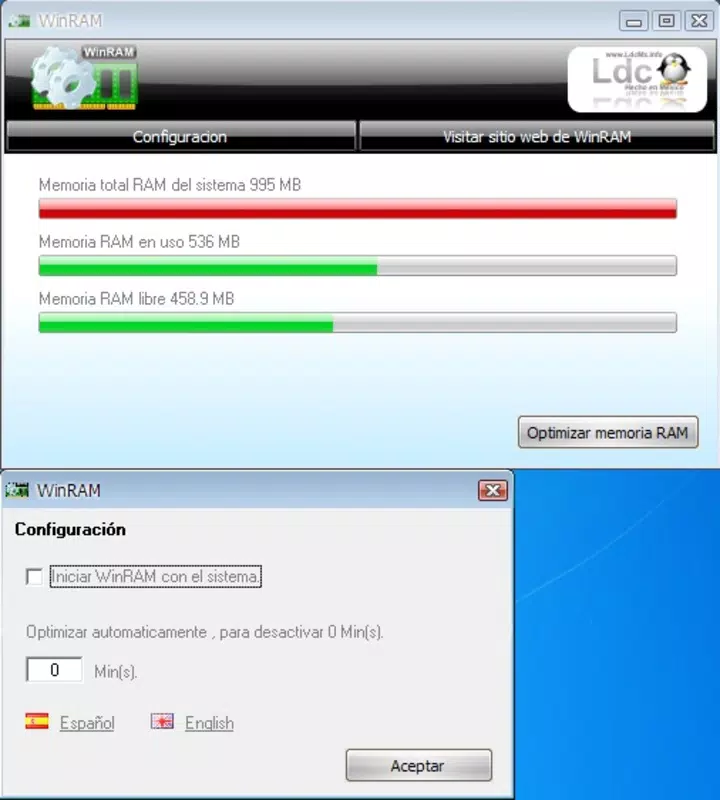
- Simple Configuration Options: Users can configure WinRAM to launch automatically with Windows startup or set a delay before the app closes after activation. These settings allow for a personalized experience without requiring technical expertise.
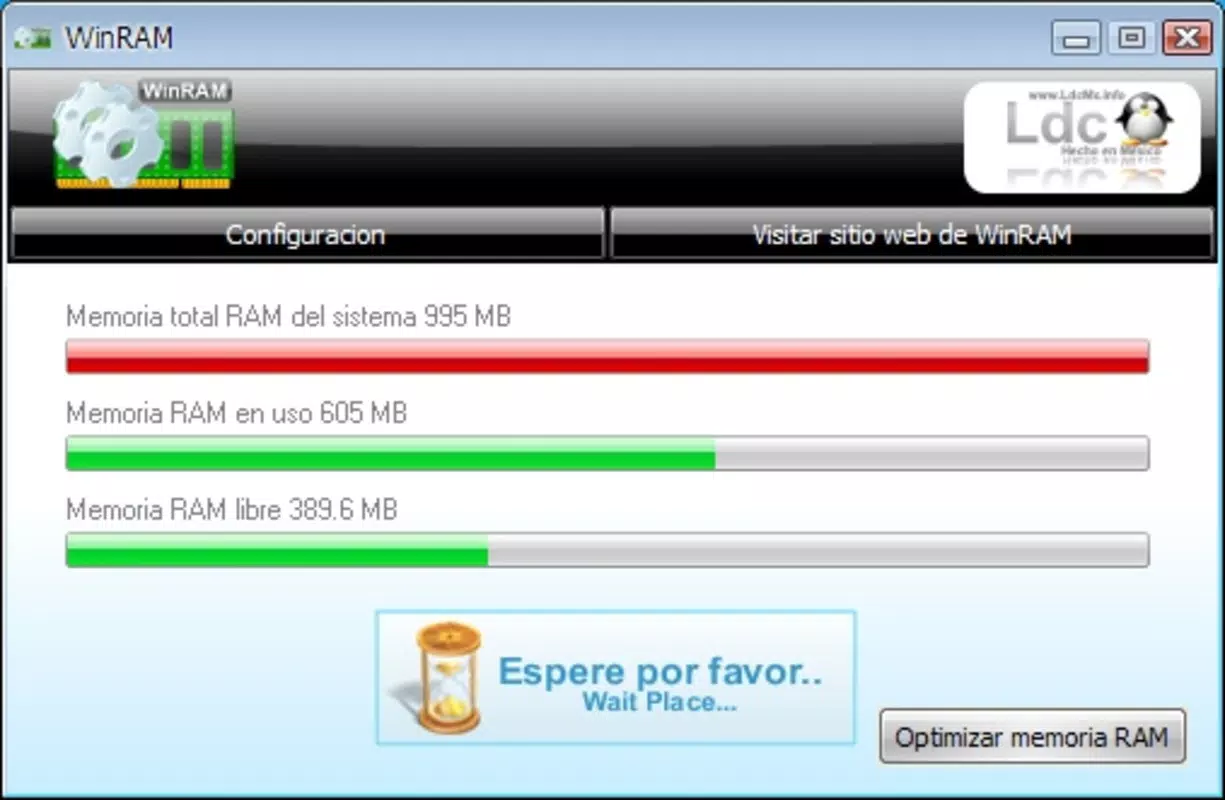
- User-Friendly Interface: The interface is minimal and intuitive, requiring no prior knowledge of system optimization. Even users unfamiliar with technical tools can navigate and use WinRAM effectively.
- Performance Boost After Heavy Tasks: By clearing residual memory usage after demanding applications, WinRAM helps restore system speed, leading to faster application launches and smoother multitasking.
For example, after closing a large game or photo editing suite, WinRAM ensures that cached data and unused memory segments are released. This results in a noticeable improvement in system responsiveness when switching to a web browser or document editor. The automation removes the need for manual intervention, making it a reliable companion for users who value efficiency and simplicity.
Interface, UX & Performance
WinRAM features a clean, minimal interface that prioritizes functionality over visual flair. The layout is straightforward, with essential controls clearly labeled and accessible. Navigation is intuitive, allowing users to adjust settings with just a few clicks. There are no complex menus or hidden options, which enhances the overall user experience for non-technical users.
Although the developer did not list formal performance metrics, the app’s lightweight design suggests it operates efficiently across a range of devices. It is expected to perform smoothly on systems with varying hardware configurations, including older or budget-friendly machines. The application remains responsive even when running alongside other programs, indicating optimized resource handling.
Stability appears to be a strength, given its long-standing presence in the market. The lack of reported issues in public reviews suggests consistent behavior over time. However, no specific information was provided regarding crash rates, memory leaks, or compatibility with newer Windows versions. Users should be aware that while the app functions as intended, its design may not include advanced diagnostics or real-time monitoring features.
Platform Compatibility & Technical Requirements
WinRAM is designed for the Windows platform and is compatible with Windows operating systems. The application has a file size of 2.4 MB, making it easy to download and install on most devices. The software version is 1.0.0, and it is available at no cost to users.
The developer did not specify minimum OS requirements or compatibility with specific Windows versions beyond the general platform. As such, users should verify compatibility with their current system before installation. While the app has been in use since 2010, it may not be optimized for the latest Windows updates or security protocols, though no known issues have been reported.
Pros and Cons
Pros
- Free to download and use with no hidden costs
- Extremely lightweight at only 2.4 MB
- Automatic RAM cleanup after closing heavy applications
- Simple, intuitive interface suitable for all users
- Minimal system resource consumption
Cons
- Limited configuration options may not satisfy advanced users
- No real-time memory monitoring or detailed analytics
- Developer did not provide specific OS compatibility details
- Version 1.0.0 suggests limited recent updates
- Lack of visible support channels or documentation
FAQ
Is WinRAM safe to use on my computer?
Yes, WinRAM is a free utility designed to optimize system performance. It does not contain malware or intrusive components. However, users should always download it from trusted sources to ensure authenticity.
Does WinRAM require administrator privileges to run?
The developer did not specify whether elevated permissions are required. It is recommended to run the application with standard user rights unless otherwise indicated.
Can I uninstall WinRAM anytime?
Yes, WinRAM can be uninstalled through the standard Windows Control Panel or Settings app. The process is straightforward and does not leave behind residual files.
Is WinRAM compatible with Windows 11?
While the app is designed for Windows, specific compatibility with Windows 11 was not confirmed by the developer. Users should test the application on their system to verify functionality.
How often does WinRAM clean RAM?
WinRAM automatically cleans RAM when a memory-heavy application is closed. It does not perform scheduled cleanups unless configured to do so through its available settings.
Final Thoughts + CTA
WinRAM remains a dependable solution for users seeking a simple, no-cost method to improve their computer’s performance. Its automatic memory cleanup feature, combined with a lightweight design and user-friendly interface, makes it accessible to a wide range of users, especially those without technical backgrounds. While it lacks advanced features like real-time monitoring or detailed analytics, its core functionality is effective and reliable.
For individuals using older systems or those with limited RAM, WinRAM offers a practical way to reclaim performance without installing complex tools. Its minimal impact on system resources ensures it runs quietly in the background, enhancing efficiency without distraction.
Despite its age and limited updates, the app continues to serve its purpose well. If you’re looking for a straightforward tool to boost your system’s speed after heavy tasks, WinRAM delivers value without complexity.
Download WinRAM now


